Formulas and Screen Readers
Making formulas in PDFs requires tagging them. When a formula is presented as an image or a paragraph, Mathematical Markup Language (MathML) can be used - but Adobe Acrobat does not natively use or edit MathML.
Using the alternative text within tags in a PDF ensures formulas continue to remain perceivable, operable, understandable and robust.
There are situations a formula may be an image where the Formula tag is used. According to PDF/UA accessibility guidelines, “All mathematical expressions shall be enclosed within a Formula tag and shall have an ALT attribute.” The use cases below are in the context of making formulas accessible when tagged as a paragraph, with the alternative text attribute defined.
To learn more information about accessibility in different content use cases, a great resource worth checking out is visiting accessiblewebsiteservices.com.
Tagging Formulas
Use Case: Inline Tagging as one element
Since the formula is part of a sentence, wrap the formula with an inline tag nested in a paragraph tag declaring the actual text.
- insert Actual text on the inner span tag
- use human language to avoid unambiguous spoken math (avoid 'x' spoken letter)
- X = times
- / = divided by
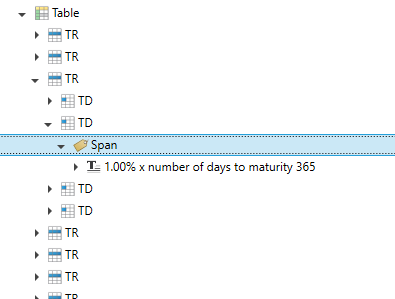
Below is a screenshot of how to make a formula accessible in a PDF document, using the span tag: The alternative text would be "1.00% times number of days to maturity 365".
Use Case: Inline Tagging with another element
Since the formula is its own element and not a part of a sentence, wrap the formula within a tag. In alignment to the semantic of a data cell, single data points are not wrapped in a paragraph tag, but a data cell. Therefore, a span tag is used to declare the actual text.
- Insert Actual text on the paragraph tag
- Similar to the use case above, use human language to avoid unambiguous spoken math
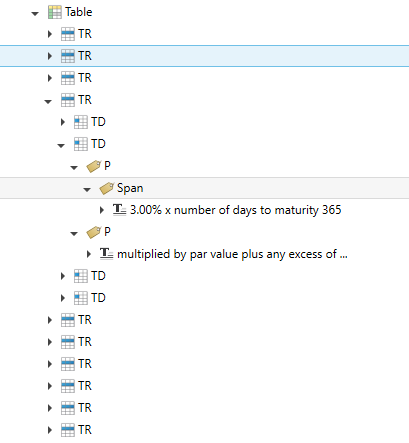
Below is a screenshot of how to make a formula accessible with a surrounding paragraph tag: